 Jun Lee
AI for Personal Injury Lawyers: What to Hand Off and Keep
AI for Personal Injury Lawyers: What to Hand Off and Keep
AI for personal injury lawyers, task by task: what to automate, what you keep, how to check AI work, what bar guidance says, and how to choose a tool.

Every vendor pitch says the same thing: AI will write your demands. Some of that is true. Some of it will get a wrong date into a letter with your name on it.
So the useful question about AI for personal injury lawyers isn't whether to use it. It's which tasks to hand over and which to keep. This guide maps the PI workflow task by task, shows how to check the AI's part, and covers what bar guidance says. Our short answer: AI for assembly, humans for verification and strategy.

What Can AI Do for Personal Injury Lawyers?
AI for personal injury lawyers is best at the assembly work in a case: sort and de-duplicate records, pull dates, providers, diagnoses and bills into a chronology, draft a first version of the demand, and summarize long documents. It can't decide what a case is worth or carry a causation theory. Those stay with you.
That split isn't modesty. It follows from how the technology works, which we'll get to. First, the map.
The PI Workflow, Task by Task
Here's every major step in a pre-lit PI case, what AI can reasonably do there, what you keep, and how to check the AI's part. The last column is the one most AI guides leave out.
| Task | AI can | You keep | How to check the AI |
|---|---|---|---|
| Intake | Summarize the intake call or form | Whether to take the case | Read the summary against the notes |
| Records collection | Little; it can track what's missing once records arrive | Requests, follow-ups, completeness | Confirm every provider is in the file |
| Organizing records | Sort by date and provider; flag duplicates | Deciding what's relevant | Spot-check the sort against the index |
| Medical chronology | Extract each encounter with a source page | What the gaps and priors mean | Pick ten entries; find each on its page |
| Specials | Pull charges from itemized bills | Liens, write-offs, what to claim | Total the bills yourself; match the table |
| Liability | Pull facts from the police report and statements | The liability theory | Read the report yourself |
| Causation | Surface what the treating doctors wrote | The causation argument | Quote the doctor; never the AI |
| Demand draft | Draft the sections from the checked facts | Emphasis, tone, every final word | Read it as the adjuster will |
| The number | Nothing you should rely on | All of it | — |
| Negotiation | Summarize offers and the carrier's stated reasons | Every move | Compare with the carrier's letters |
| Client updates | Draft routine status letters | Advice, bad news, settlement calls | Read before sending |
Notice the pattern. AI is strongest where the work is reading and copying facts from documents. It's weakest where the work is judgment. Our guides to AI medical chronology and each section of a demand letter go deeper on the two biggest rows.

Why Does AI Get Facts Wrong?
AI gets facts wrong because a language model predicts the next word; it doesn't look facts up. It writes what is likely, and a likely date isn't always the right date. Research suggests training rewards confident guessing over saying "I don't know." That's why every AI-drafted figure needs a source you can check.
Even tools built for lawyers do this. When Stanford researchers tested leading legal research AI, they found the products each hallucinated between 17% and 33% of the time, despite vendor claims. A separate paper on why language models hallucinate traces the problem to how models are trained and scored.
So we don't promise a draft without mistakes. We promise that every figure traces to a page you can open. Our post on why AI demand letters get numbers wrong explains the mechanism in detail.
What Do the Ethics Rules Say About AI for Lawyers?
Bar guidance lets lawyers use generative AI, with duties attached. Florida's Opinion 24-1 and California's practical guidance agree on the core: protect client confidentiality, understand the tool, review and verify its output, and bill fairly. Neither treats AI as a reason to lower the standard. Check your own state bar before you adopt a tool.
The Florida Bar's Opinion 24-1 (January 2024) compares AI to a nonlawyer assistant. The lawyer reviews its work the way they'd review a paralegal's. It tells lawyers to research a program's data retention, sharing and self-learning policies. And it says a chatbot that talks to the public must disclose that it's AI.
The State Bar of California's practical guidance, updated in 2026, says the lawyer must review, verify and correct AI output. It also says hourly billing must reflect the time actually spent.
None of this is legal advice for your firm. It's a reason to pick tools that make review easy. For the confidentiality side with medical records, see our guide to HIPAA and AI demand letters.

How to Check AI Work Without Redoing It
If checking an AI draft takes as long as writing it, you've gained nothing. These checks are fast because each one is yes or no.
- 1Every figure has a source page. If a number has no page, treat it as unverified.
- 2Ten random entries match. Open each page. Check the date, the provider and the number.
- 3The totals reconcile. The specials in the letter equal the bills you totaled yourself.
- 4Causation quotes a doctor. Any causal claim is attributed to a treating provider, with a page.
- 5Every citation exists. If the draft cites a statute or case, pull it and read it.
- 6You read the ask. The demand amount and the deadline are yours, word for word.
Here's the kind of sentence the check catches.
AI draft: Ms. Martinez underwent extensive physical therapy for several months.
Checked: Ms. Martinez attended five physical therapy visits from September 18 to October 2, 2025 (pp. 12–21).
The first sentence sounds fine and proves nothing. The second gives the adjuster a count, dates and a page, and it's true. "Several months" was the model filling a gap with something plausible.
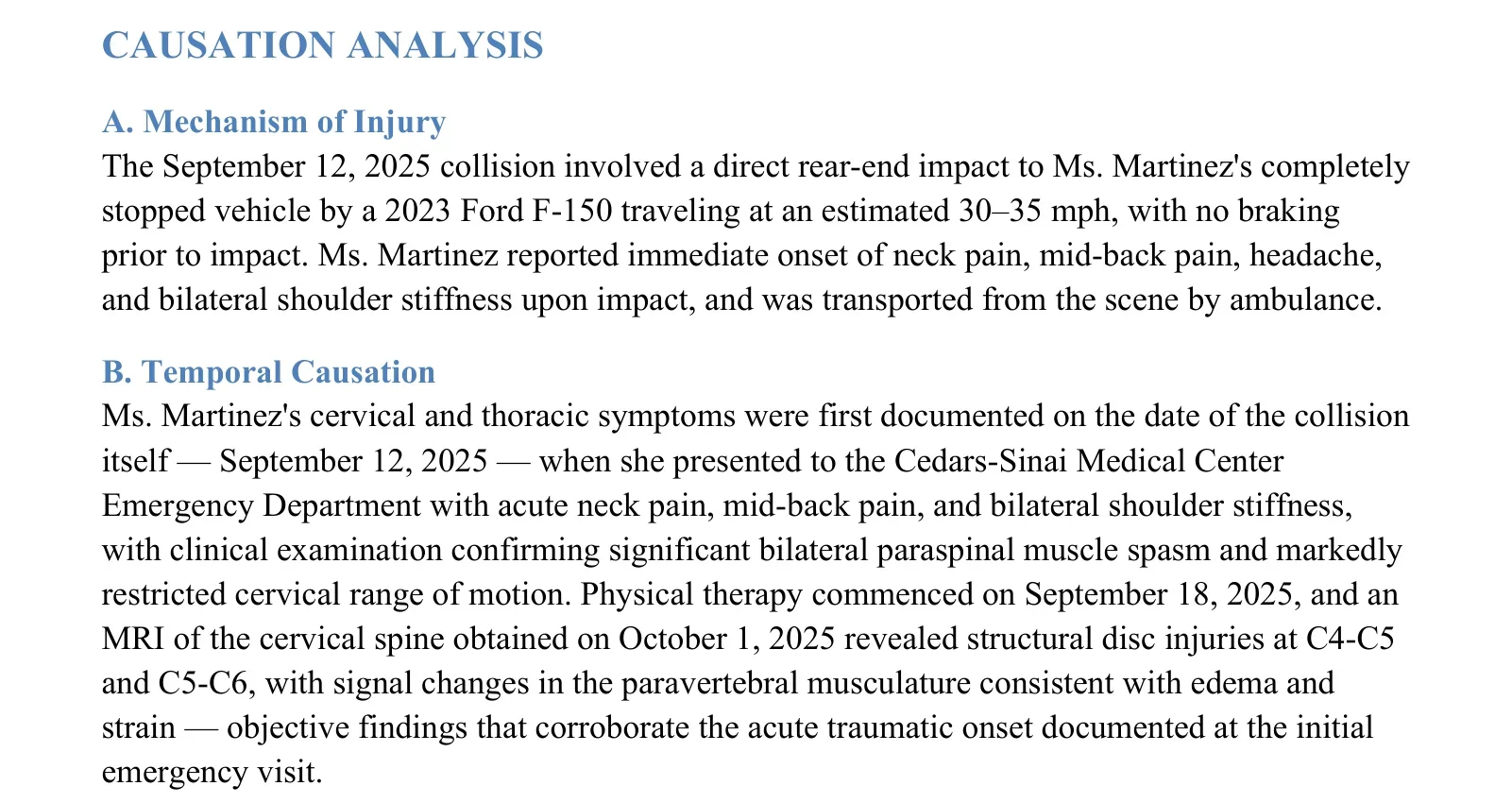
Here's what an AI-drafted section looks like when it's built to be checked. Each claim points back to a record: the crash date, the first ER visit, the MRI. You still decide whether it makes the argument you want.
Is AI Safe to Use With Client Medical Records?
It can be, if you know where the records go. Before any client file enters an AI tool, find out whether the data trains the vendor's models, how long it's stored, which subprocessors see it, and what agreements cover it. A consumer chatbot account rarely answers those questions. A tool built for medical records should answer them in writing.
Medical records carry more than diagnoses. They hold Social Security numbers, insurance IDs, mental health notes and family history. Most of that never belongs in a demand. A good tool pulls only what the case needs into the draft, and leaves the rest in the file.
Ask for the security terms before the demo, not after the contract. The vendor's answers tell you as much about the company as about the product.
Which AI Tools Do PI Firms Use?
PI firms use five kinds of AI tools: general chatbots, legal research AI, demand letter and medical chronology tools, practice management software with AI features, and intake chat. Each fits a different task. The best AI tools for PI attorneys are the ones that match your slowest task and let you check their output quickly.
| Category | Good for | Watch out for |
|---|---|---|
| General chatbots | Routine letters, rewording, brainstorming | Data terms on consumer accounts; no source pages |
| Legal research AI | Finding authority faster | Citations that don't say what the summary claims |
| Demand and chronology tools | Records-heavy assembly: chronology, specials, first draft | Figures without a page; locked formats |
| Practice management with AI | Summaries and tasks inside your case system | Where the data goes; what the AI can see |
| Intake chat | Answering leads after hours | Florida's ethics opinion calls for an AI disclaimer; advertising rules apply |
A general chatbot and a records tool can produce similar-looking paragraphs. The difference shows up when you check them. The chatbot gives you prose with no trail back to the file, so you check every line by hand. A tool built around the records hands you the page for each fact, so you check the facts that matter and move on. That's the whole case for a purpose-built tool: not better sentences, shorter review.
Most small firms don't need all five. Start where the hours go. For most PI practices, that's the records. Our post on the real cost of manual demand letters shows how to find those hours, and what AI changes for small firms covers the adoption side.
How to Choose an AI Tool for Your PI Firm
Ask the same questions of every tool, and test it on a closed case you already know. The answers you can't get in writing are the ones that will surprise you later.
- Traceability: Does every figure link to the page it came from?
- Review: Can you correct or remove an extracted fact before the draft is built?
- Output: Can you edit the result in Word?
- Data: Is your data used to train models? How long is it kept? Who are the subprocessors?
- Agreements: Will they sign a BAA where one applies, and does it cover every model provider in the pipeline? HHS's business associate FAQ covers when one is needed.
- Trial: Can you run one real case before you commit?
If you're also weighing outside review services, our guide to choosing a medical record review service uses the same closed-file test.

How to Roll Out AI in a Small PI Firm
Start small and write it down. Pick one task, test one tool on a closed case, and set a short written policy for how your firm uses it. Florida's opinion asks lawyers to develop policies for AI use, and a one-page policy is enough to start. Then train everyone who touches the tool.
- 1Pick one task. Choose the slowest records-heavy step, usually the chronology or the first draft of the demand.
- 2Time it first. Track how long that step takes your team today on a few cases. You need your own baseline, not a vendor's.
- 3Run a closed case. Give the tool a file you already finished. Compare its output with what you sent.
- 4Write the policy. Which tools are approved, what data can go in, and who checks the output before it leaves the firm.
- 5Review after a month. Look at what the checks caught and how long they took. Keep the tool only if review is faster than writing.
Talk to your clients, too. Some fee agreements and engagement letters now say how the firm uses AI. California's guidance ties billing to time actually spent, so think about how faster drafting shows up on hourly matters. Most PI work is contingency, but costs and any hourly work still need care.
When You Shouldn't Use AI
Some cases aren't worth the setup. A two-visit soft-tissue claim with one bill may be faster to write by hand. A case that turns on one contested medical question needs a physician, not a model.
The same goes for a case where the records are mostly handwritten or badly scanned. A model reading a smudged note can misread a date as confidently as it reads a clean one. In those files, a human read comes first.
And don't use a tool whose data terms you haven't read. Convenience isn't a reason to put a client's medical history somewhere you can't account for.
Be careful, too, with anything a client will read directly. An AI-drafted status letter that gets a date wrong costs trust you'll spend months rebuilding. Read every client-facing message before it goes out, the same as you would a junior associate's.
Where Lexyno Fits
Lexyno handles the assembly rows of that table. It reads the case's records, extracts medical events and bills with source pages, and drafts a 14 to 16 section demand letter you can export to Word. Medical Summary adds the chronology, a treatment calendar that flags gaps over 30 days, and a plain-English narrative. Your team can review, correct or remove any event.
On the judgment side, Lexyno only surfaces. AI Strategy flags causation, liability and damages issues as a memo that counsel approves, rejects or rewrites. POV reports read the same record from the attorney's side and, on Professional plans, the insurer's. The decisions stay yours. Plans are on the pricing page, and our Fact-Lock™ explainer shows how figures are checked against their source.

Automate the Reading, Keep the Judgment
The best use of AI for personal injury lawyers is narrow, and a little boring. Let it read, sort and draft. Check what it wrote against the page. Keep the theory, the number and the negotiation.
The machine assembles the file. You decide what it's worth.
Start from our PI demand letter template, or try Lexyno on one case from your own file, free.
Frequently asked questions
Mostly for assembly work: organizing medical records, extracting dates and bills into a chronology, drafting the first version of a demand letter, and summarizing long documents. The decisions stay with the attorney: whether to take the case, the causation theory, the settlement number and the negotiation.
It depends on the task. General chatbots help with first drafts of routine writing. Legal research AI helps find authority but needs every citation checked. Demand letter and medical chronology tools handle the records-heavy work. Pick by the task you most need to speed up, and test on a closed case first.
AI can draft one from the case records, including the medical chronology, the treatment narrative and the specials. The attorney still has to check the facts against the records, decide the causation theory and the number, and sign it. A draft with a source page on every figure is much faster to check.
Bar guidance says yes, with duties attached. The Florida Bar’s Opinion 24-1 and the State Bar of California’s practical guidance both say lawyers must protect client confidentiality, review and verify AI output, and bill fairly. Check your own state bar’s guidance before you adopt a tool.
Not into a consumer chatbot account without knowing how it stores, shares and learns from the data. The Florida Bar’s opinion tells lawyers to research a program’s data retention, sharing and self-learning policies first. For medical records, look for business terms, security commitments and a BAA where one applies.
No. AI can speed up the reading and drafting, but it does not decide what a case is worth, carry a causation theory, negotiate with an adjuster or take responsibility for the result. The lawyer’s name is on the letter, and bar guidance keeps the lawyer responsible for the work.
Related posts

AI Medical Chronology: How It Works and What to Check
How AI medical chronology software turns PI medical records into a source-linked timeline, where it goes wrong, and eight checks before your firm buys one.

Why Your AI Demand Letter Keeps Getting the Numbers Wrong
AI demand letter tools get figures wrong because language models predict numbers rather than look them up. Here is why, and the process that catches it.

Solo PI Attorney vs. Big Firm: How AI Levels the Playing Field
No firm dominates the $61.7B personal injury market, yet large firms use AI at nearly three times the rate of solos. That gap, not talent, is what AI can close.
What's next?
Ready to see the difference in your next case?
Put these strategies to work. Try a mock demand generated by Lexyno today.
Request Evaluation Access