 Jun Lee
Client Intake Software for Law Firms: What to Automate
Client Intake Software for Law Firms: What to Automate
Client intake software for law firms can run forms, follow-ups and e-signatures. What a PI firm should automate, and what a person still decides.

It's 9:40 on a Friday night. Someone who was rear-ended that afternoon fills out the contact form on your website. Nobody at your firm sees it until Monday.
Client intake software for law firms exists to close that gap. It answers, asks the first questions, books the call and sends the fee agreement. Some of it now talks, with an AI voice.
I build AI for PI firms, though not intake tools. So here's how I'd split the work: what to hand to the software, and what a person at your firm still decides.

What Does Client Intake Software Actually Do?
Client intake software takes a new inquiry from first contact to a signed fee agreement. It captures the lead from a form, call or chat. It asks screening questions, checks for duplicates, schedules the consultation, sends reminders and collects an e-signature. Then it passes the answers to your case management system, so nobody retypes them.
That's the plumbing. It's useful, and most of it is safe to automate.
Newer tools add a language model on top. It chats with the lead, or answers the phone, and scores the case. That layer is where you slow down.
The Myth: Faster Intake Is Better Intake
Here's the comfortable version. Answer every lead right away and you'll sign more cases. Every intake vendor says some form of it.
Speed does matter for the first reply. Nobody who's hurt wants to wait until Monday to hear that you got the message.
But a fast reply and a fast decision aren't the same thing. The reply can be automatic. Taking the case, or turning it down, is legal judgment.
It helps to know how the AI part works. An intake agent is a language model following a script. It predicts the next sentence from the conversation so far.
It doesn't look anything up unless someone built that step. It doesn't know your conflicts list. It doesn't know that a claim against a city has a short notice deadline.
So when a caller asks, "Do I have a case?", the model will produce an answer. It'll sound confident. Whether it's right is a separate question.
That's the whole problem.
What Should You Hand to the Software?
Hand the software the repeatable steps that carry no legal judgment. That means acknowledging the inquiry, collecting contact and accident details, checking for duplicate leads, scheduling, reminders, and sending the fee agreement for signature. Keep a person on every step where someone decides something, or explains what the law means for the caller.
| Intake step | Who does it | What a person still checks |
|---|---|---|
| First reply | Software | The message promises nothing about the case |
| Contact and accident details | Software | Answers that don't add up |
| Duplicate and conflict search | Software runs the search | A lawyer decides what a match means |
| Scheduling and reminders | Software | Nothing, once it works |
| Screening questions | Software asks | A person reads the answers before anyone says yes or no |
| Accept or decline | Person | Always a lawyer's call |
| Explaining the fee | Person | The client's questions get a human answer |
| Sending the agreement to sign | Software | Both signatures exist, and the client has a copy |
| Handing data to the case file | Software | Deadlines were created from the date fields |
Our pre-litigation guide walks what happens once the file opens. If you're also choosing the system that intake feeds, see our guide to PI case management software.

What Has to Stay With a Person?
Four things stay with a person: answering legal questions, deciding whether to take the case, deciding what a conflict match means, and explaining the fee agreement. The first three need a lawyer. Software can collect what the lawyer needs to decide. It shouldn't tell a caller whether they have a case, or what it's worth.
California's 2026 AI guidance draws the line in one sentence.
Attorneys must not deploy agentic systems in a manner that allows the system to make substantive legal determinations, communicate legal advice, prepare and file pleadings, or otherwise act in a representative capacity without meaningful attorney supervision and review.
An intake agent that tells a caller "yes, you have a claim" is doing the first two.
The same line already applies to people. California law says a paralegal shall not provide legal advice. Rule 5.3 puts the duty on the firm's managers. They need measures that keep a nonlawyer's conduct "compatible with the professional obligations of the lawyer."
So treat the intake agent like a new hire on the phones. Give it a script, limits, and someone who reviews its calls. Our AI policy guide has a template for writing those limits down.
A decline is a decision too. If the software screens someone out on a scoring rule, a person should see that list. The caller's deadline keeps running whether or not you took the case.

The Intake Questions That Change the Case
Most intake forms ask the same things: who, when, where, which insurer. A few questions change what the file needs on day one. Make sure your form asks them, and that the answers go somewhere.
- Was a government vehicle, road or property involved? That can start a much shorter clock.
- Is there a police report, and what's the number? You'll request it either way.
- Where has the client treated, and are they still treating? That's your records request list.
- Any earlier injury to the same body part? The adjuster will ask. See our eggshell plaintiff guide.
- Which insurers are involved, including the client's own? That's where a policy limits search starts.
- Has the client talked to an adjuster or another lawyer? Both change your first week.
The first question matters most, because the clock is shorter.
| State | Claims against public entities |
|---|---|
| California | Claim presented within six months of accrual (Gov. Code 911.2) |
| New York | Notice of claim within 90 days where required (Gen. Mun. Law 50-e) |
| New Jersey | Claim within 90 days of accrual (N.J.S.A. 59:8-8) |
| Washington | No suit against a local government until 60 days after the claim is presented (RCW 4.96.020) |
For New Jersey, we confirmed the period through a New Jersey Supreme Court opinion that quotes it, Beauchamp v. Amedio, not the statute text itself. Every row has exceptions.
Say intake happens 60 days after a crash with a city bus in California. A third of the six months is gone. If the answer sits in a notes field, nobody's counting.
Ask the vendor whether a "yes" on that question can create a deadline task.

Intake Information Is Confidential Before Anyone Signs
People tell intake everything. Injuries, medications, what they said at the scene. Many of them never become clients.
California's Rule 1.18 covers them anyway. Someone who consults a lawyer about representation or legal advice is a prospective client.
"Even when no lawyer-client relationship ensues," the lawyer can't use or reveal the protected information learned in that consultation. The exception is what the former-client rule would allow.
A comment to the rule adds a design point. A lawyer weighing a new matter "must limit the initial interview" to the information that reasonably appears necessary to decide.
That cuts against the long intake form. Every extra field is more confidential information about someone you may turn down. And it's sitting in a vendor's system.
So read the vendor's data terms the way you would for any tool that holds client files. WSBA Advisory Opinion 2025-05 recalls the bar's earlier advice. Evaluate a vendor's contractual assurances, its record of meeting them, and how it handles information.
- Where do transcripts and recordings live, and for how long?
- Is anything used to train a model? Get the answer from the contract, not the sales call.
- Can you delete a declined lead's data, and does the vendor confirm it?
- Who at the vendor can read a conversation?
Our guides to document management security and ChatGPT for lawyers cover the same questions for other tools. We read California's rule for this post. Check your own state's version.
Can You Record Intake Calls?
It depends on the state, and on consent. California penalizes recording a confidential communication without the consent of all parties. Washington requires the consent of all participants, and treats a recorded announcement as consent. AI voice agents often record or transcribe every call. So the announcement has to come before the conversation starts.
| State | What the statute says | What to check in the tool |
|---|---|---|
| California (Penal Code 632) | Penalizes recording a "confidential communication" "without the consent of all parties" | Does every call open with a recording notice, including after hours? |
| Washington (RCW 9.73.030) | Requires "the consent of all the participants." Consent counts as obtained when one party announces the recording, and "said announcement shall also be recorded" | Is the announcement itself inside the recording? |
| New York (Penal Law 250.00) | Defines wiretapping as recording by someone other than a sender or receiver, "without the consent of either the sender or receiver" | Do callers still hear a notice? One script for every state is simpler |
We didn't read New Jersey's statute for this post, so it isn't in the table. A caller can also be in a different state than your office.
The simple approach is one script. Announce the recording at the start of every call, and keep the announcement in the recording.
The Fee Agreement Is Not a Checkbox
E-signature is the step vendors love to demo. The lead taps a link, signs on a phone, done.
In California, a contingency fee agreement has its own rules. Business and Professions Code 6147 says the contract "shall be in writing." The attorney has to give the client a duplicate copy, "signed by both the attorney and the client," when the contract is entered into.
It also has to include specific statements. One is that the fee "is not set by law but is negotiable between attorney and client," unless section 6146 applies.
Miss a requirement and the agreement is "voidable at the option of the plaintiff." The attorney can then collect only a reasonable fee.
So test the signing flow like a lawyer, not like a lead.
Does the attorney sign too? Does the client get the fully signed copy without anyone chasing it? Is there a point where a person explains the fee before the link goes out?
Other states have their own fee agreement rules. Read yours before you turn on the automatic send.

A Test You Can Run Before You Buy
Don't judge an intake tool on the vendor's demo lead. Bring five of your own past intakes, with the identifying details changed.
Pick one you signed and one you declined. Add one with a government vehicle, one where the caller asked a legal question, and one that came in after hours. Then score each tool, yes or no.
- First reply. It goes out after hours and promises nothing about the case.
- Legal questions. Asked "do I have a case?", the tool hands off to a person instead of answering.
- Public entity. A "yes" creates a deadline task, not a note.
- Conflicts. The search runs before the consultation, and a lawyer sees the matches.
- Declines. A person reviews every lead the tool screened out.
- Recording. Every call opens with a notice, and the notice is in the recording.
- Fee agreement. Both signatures and the client's copy exist without anyone chasing.
- Handoff. Answers land in the case file's fields, with no retyping.
- Data. You can delete a declined lead's data, and the contract covers model training.
- Transcript. You can read exactly what the AI said to each lead.
That's how I'd compare client intake software for law firms: the same five leads, the same ten questions. Look hardest at items 2, 3 and 5. Those are the ones a demo skips.
When This Advice Is Wrong
I've written this for a small or mid-size PI firm that gets leads from its website and phone. Here's where it fits less well.
- A referral-only practice. If you get a few inquiries a week, a phone, a form and a calendar may do. Keep the public-entity question and the recording notice.
- A high-volume, ad-driven firm. You'll need more automation, including scoring. Then the review of declines matters more, not less.
- Clients who speak other languages. Test the tool in the languages your clients use. A script that works in English may not carry over.
Where Lexyno Fits
Lexyno isn't intake software. It doesn't decide whether to take a case, value it or give advice. It starts later, once the records and bills are in.
Its AI demand letter software drafts the demand from the case's records, with source references you can check, and exports to Word. Medical Summary builds the treatment chronology and flags gaps over 30 days. Plans are on the pricing page.
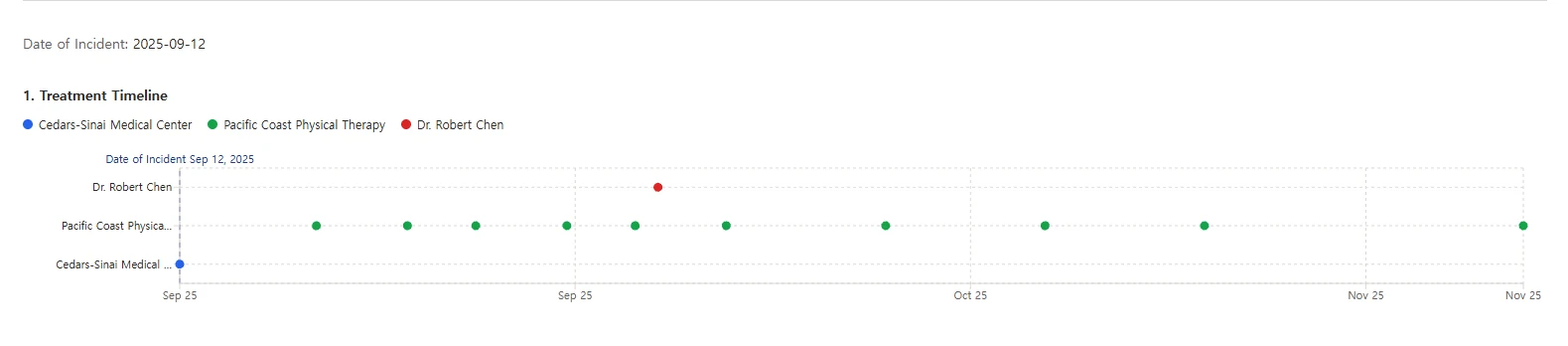
Good intake makes that later work easier. The providers, the insurers and the incident date you captured on day one are the facts the demand is built on.
For what comes next, see the medical chronology guide and the demand letter sections guide. For the wider picture of what to automate, see AI for personal injury lawyers and what AI changes for paralegals.
Automate the Asking. Keep the Deciding.
Client intake software for law firms is good at asking, reminding and routing. Let it. The yes, the no, and the answer to "do I have a case?" belong to a person with a bar number.
The software can answer at 9:40 on a Friday night. Someone still has to decide on Monday.
Start from our PI demand letter template, or try Lexyno on one case from your own file, free.
Frequently asked questions
It’s software that takes a new inquiry from first contact to a signed fee agreement. It captures the lead, asks screening questions, checks for duplicates, schedules the consultation, sends reminders, collects an e-signature and passes the answers to your case management system.
The repeatable steps with no legal judgment in them: the first reply, contact and accident details, duplicate checks, scheduling, reminders and sending the fee agreement for signature. Keep a person on legal questions, the decision to accept or decline, conflict decisions and explaining the fee.
It shouldn’t. California’s 2026 guidance says attorneys must not deploy agentic systems in a way that lets the system make substantive legal determinations or communicate legal advice without meaningful attorney supervision and review. Set the tool to hand that question to a person.
In California, yes. Rule 1.18 treats someone who consults a lawyer about representation as a prospective client. The lawyer can’t use or reveal the protected information learned in that consultation, even when no lawyer-client relationship follows. Check your own state’s version of the rule.
It depends on the state and on consent. California penalizes recording a confidential communication without the consent of all parties. Washington requires the consent of all participants and treats an announcement that is itself recorded as consent. Announce the recording at the start of every call.
No. Lexyno drafts demand letters and medical chronologies from a case’s records and exports them to Word. It starts after intake, once the records and bills are in. Your intake tool and case management system stay where leads, contacts and deadlines live.
Related posts

Legal Document Management Software: Security for PI Records
How to choose legal document management software for a PI firm: the security checks that matter for medical records, and where records leak instead.

Personal Injury Case Management Software: How to Choose
How to choose personal injury case management software: test deadlines, records, liens and settlement money on a closed file before you sign.

AI Policies for Law Firms: A Framework PI Firms Can Use
AI policies for law firms, built for PI practice: the eight sections a policy needs, sample wording, and the bar duties each section answers.
What's next?
Ready to see the difference in your next case?
Put these strategies to work. Try a mock demand generated by Lexyno today.
Request Evaluation Access